Article
Fixing Dataproc Cluster Creation Error on GC
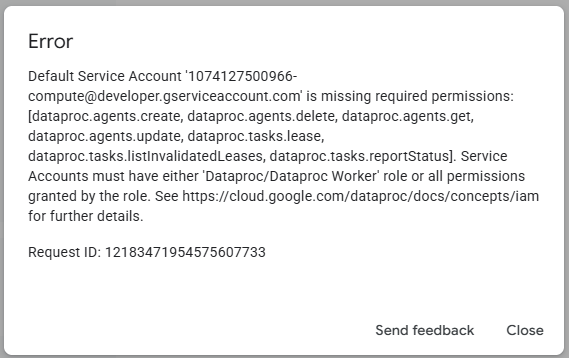
When creating a Dataproc / Managed Apache Spark cluster on Google Cloud, one common error beginners may encounter is related to the default service account permissions.
The error usually looks like this:
Default Service Account is missing required permissions:
dataproc.agents.create,dataproc.tasks.lease,dataproc.tasks.reportStatus, and other Dataproc-related permissions.
At first, this can be confusing because the cluster configuration page does not clearly show where to fix the problem. The issue is not usually caused by the cluster settings themselves. It is an IAM permission problem.
What causes the error?
Google Cloud uses a service account to allow the cluster’s virtual machines to communicate with Dataproc services. In many projects, this is the Compute Engine default service account, which looks similar to:
PROJECT_NUMBER-compute@developer.gserviceaccount.comIf this service account does not have the correct Dataproc permissions, Google Cloud will block the cluster creation.
The solution
The fix is to grant the default service account the Dataproc Worker role.
To do this:
- Open Google Cloud Console.
- Go to IAM & Admin.
- Select IAM.
- Click Grant access.
- Paste the affected service account email.
- Under roles, search for Dataproc Worker.
- Select the role and click Save.
- Return to the Dataproc cluster page and create the cluster again.
Once this role is added, the cluster should create successfully.
Why this works
The Dataproc Worker role gives the service account the permissions it needs to manage Dataproc agents and report cluster task status. Without these permissions, the cluster cannot properly initialise, even if all other settings appear correct.
Important note
The error may appear while you are on the cluster configuration screen, but the fix is not found in the cluster form. It must be corrected from the IAM permissions page.
Also, settings such as Internal IP only are not the main cause of this specific error. The main issue is the missing IAM role on the service account.
Conclusion
If your Dataproc cluster fails with a missing permission error, check the service account first. Granting the Dataproc Worker role to the Compute Engine default service account is often enough to resolve the problem and allow the cluster to be created successfully.
Discussion
0 Comments
No comments yet. Be the first to share your thoughts!
Leave a Reply
Share your thoughts
*Your comment will be reviewed before it appears publicly.